In this guide, I will illustrate the process of setting up a checkout system in Laravel using Stripe. By the end of this tutorial, a functional checkout system will be ready for our Laravel application.
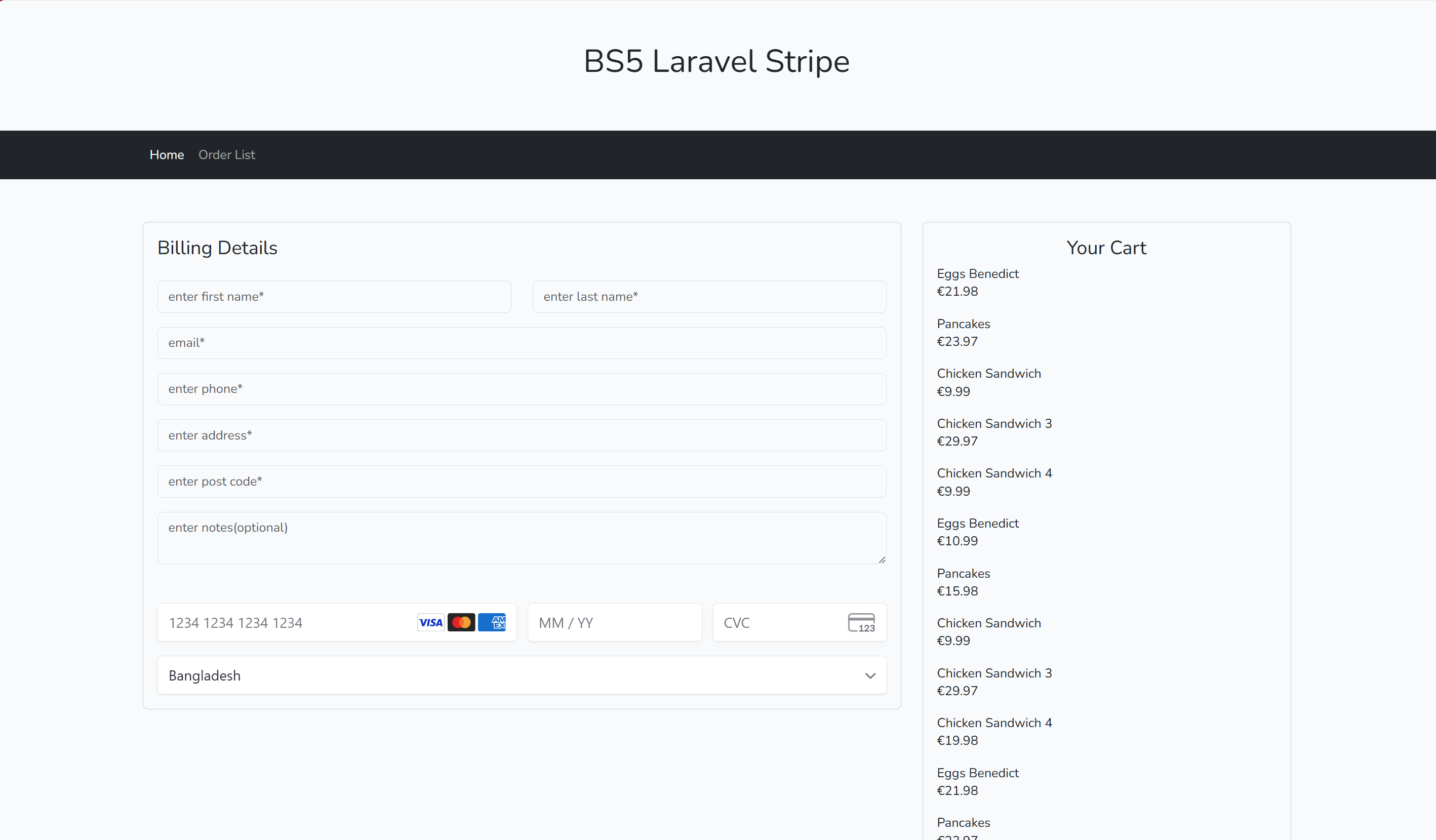
Step 1: Migration, factory and seeder setup for users, carts, orders, order_items and food_items tables
1. users table
Schema::create('users', function (Blueprint $table) {
    $table->id();
    $table->string('first_name');
    $table->string('last_name');
    $table->string('address')->nullable();
    $table->string('phone')->nullable();
    $table->string('post_code', 20)->nullable();
    $table->foreignId('city_id')->default(0)->constrained()->onDelete('cascade');
    $table->string('email')->unique();
    $table->timestamp('email_verified_at')->nullable();
    $table->string('password')->nullable();
    $table->rememberToken();
    $table->timestamps();
});
2. carts table
Schema::create('carts', function (Blueprint $table) {
    $table->id();
    $table->string('purchase_session_id');
    $table->foreignId('food_item_id')->constrained()->onDelete('cascade');
    $table->integer('quantity');
    $table->decimal('price', 8, 2);
    $table->integer('discount')->default(0);
    $table->timestamps();
});
3. orders table
Schema::create('orders', function (Blueprint $table) {
    $table->id();
    $table->string('purchase_order_id');
    $table->foreignId('user_id')->constrained()->onDelete('cascade');
    $table->string('status')->default('order_placed');
    $table->string('payment_method');
    $table->string('shipping_cost',20)->default(0);
    $table->decimal('price', 10, 2);
    $table->string('transaction_id',255)->nullable();
    $table->string('notes',255)->nullable();
    $table->string('order_type',255)->nullable();
    $table->string('refund_status',255)->nullable();
    $table->timestamps();
});
4. order_items table
Schema::create('order_items', function (Blueprint $table) {
    $table->id();
    $table->foreignId('order_id')->constrained()->onDelete('cascade');
    $table->foreignId('food_item_id')->constrained()->onDelete('cascade');
    $table->integer('quantity');
    $table->decimal('price', 8, 2);
    $table->integer('discount')->default(0);
    $table->timestamps();
});
5. Food items table
Schema::create('food_items', function (Blueprint $table) {
    $table->id();
    $table->string('name');
    $table->text('description')->nullable();
    $table->decimal('price', 8, 2);
    $table->smallInteger('published')->default(0);
    $table->timestamps();
});
Step 2: Model Setup
Next, we define the necessary models: User, Order, and OrderItem.
// User Model - represents the customers of our application
class User extends Authenticatable
{

    /**
     * The attributes that are mass assignable.
     *
     * @var array<int, string>
     */
    protected $fillable = [
        'role_id',
        'first_name',
        'last_name',
        'username',
        'email',
        'password',
        'address',
        'phone',
        'city_id',
        'post_code'
    ];

}
// Order Model - handles details of each order
namespace App\Models;

use Illuminate\Database\Eloquent\Factories\HasFactory;
use Illuminate\Database\Eloquent\Model;

class Order extends Model
{
    use HasFactory;

    protected $fillable = [
        'purchase_order_id',
        'user_id',
        'status',
        'payment_method',
        'shipping_cost',
        'transaction_id',
        'price',
        'notes',
        'order_type',
        'refund_status'
    ];

    public function user() {
        return $this->belongsTo(User::class);
    }

    public function items() {
        return $this->hasMany(OrderItem::class);
    }
}
// OrderItem Model - represents individual items within an order
namespace App\Models;

use Illuminate\Database\Eloquent\Factories\HasFactory;
use Illuminate\Database\Eloquent\Model;

class OrderItem extends Model
{
    use HasFactory;

    protected $fillable = [
        'order_id',
        'food_item_id',
        'quantity',
        'price',
        'discount'
    ];

    public function food() {
        return $this->belongsTo(FoodItem::class, 'food_item_id');
    }
}
// Cart Model - represents each item within a cart
use Illuminate\Database\Eloquent\Factories\HasFactory;
use Illuminate\Database\Eloquent\Model;
use Illuminate\Database\Eloquent\Relations\BelongsTo;

class Cart extends Model
{
    use HasFactory;

    protected $fillable = ['purchase_session_id', 'food_item_id', 'quantity' , 'price' , 'discount' ];

    public function food_item(): BelongsTo
    {
        return $this->belongsTo(FoodItem::class);
    }
}
// FoodItem Model - represents food items for customer cartingStep 3: Now setup of factory and seeder
use Illuminate\Database\Eloquent\Model; use Illuminate\Database\Eloquent\Relations\BelongsTo;
class FoodItem extends Model { use HasFactory; protected $fillable = [ 'name', 'price', 'discount' ,'description', 'published']; }
// factory
// UserFactory.php
public function definition(): array
{
    return [
        'first_name' => fake()->firstName(),
        'last_name' => fake()->lastName(),
        'address' => fake()->address(),
        'phone' => fake()->phoneNumber(),
        'email' => fake()->unique()->safeEmail(),
        'email_verified_at' => now(),
        'password' => static::$password ??= Hash::make('password'),
        'remember_token' => Str::random(10),
    ];
}

// seeders
// UserSeeder.php
public function run(): void
{
    User::factory(10)->create();
}

//FoodSeeder.php
public function run(): void
{
    $foodItem = FoodItem::create(['name' => 'Eggs Benedict', 'price' => 10.99 , 'published' => 1]);
    $foodItem = FoodItem::create(['name' => 'Pancakes', 'price' => 7.99, 'published' => 1]);
    $foodItem = FoodItem::create(['name' => 'Chicken Sandwich', 'price' => 9.99, 'published' => 1]);
    $foodItem = FoodItem::create(['name' => 'Chicken Sandwich 3', 'price' => 9.99, 'published' => 1]);
    $foodItem = FoodItem::create(['name' => 'Chicken Sandwich 4', 'price' => 9.99, 'published' => 1]);
}
//DatabaseSeeder.php
public function run(): void
{
    $this->call(UserSeeder::class);
    $this->call(FoodItemSeeder::class);
}
Step 4: Stripe PHP library setup using composer
composer require stripe/stripe-php
Step 5: Setup Helpers/Helper.php file with necessary cart and checkout processing functions
use App\Models\Cart;
use App\Models\Order;

function top_cart_query()
{
    $cart_session = session()->get('cart_session');
    return Cart::with(['food_item'])->where('purchase_session_id', $cart_session)->get();
}

function cart_row_total($product_id) {
    $cart_row_summary = Cart::where([
        'purchase_session_id' => session()->get('cart_session'),
        'food_item_id' => $product_id
    ])->get();

    $total = 0;
    foreach ($cart_row_summary as $item) {
        $itemPrice = ($item->discount > 0 ) ? calDiscount($item->price, $item->discount) : $item->price;
        $total += $itemPrice * $item->quantity;
    }
    return number_format($total,2);
}

function cart_summary() {

    $cart = top_cart_query();
    $total = 0;
    $qty = 0;
    foreach ($cart as $item) {
        $itemPrice = ($item->discount > 0 ) ? calDiscount($item->price, $item->discount) : $item->price;
        $total += $itemPrice * $item->quantity;
        $qty += $item->quantity;
    }
    return [
        'total' => number_format($total,2),
        'qty' => $qty
    ];
}

function clearCart() {
    Cart::where('purchase_session_id', session()->get('cart_session'))->delete();
    session()->forget('cart_session');
}

function calDiscount($price, $discount) {
    return number_format($price - ( $price * $discount / 100 ), 2);
}

function getLastOrderNo() {
    $lastOrder = Order::latest('id')->first();
    return str_pad($lastOrder ? $lastOrder->id + 1 : 1, 5, '0', STR_PAD_LEFT);
}
Now we need to add "files" section mentioning above Helper.php under "autoload" json element inside composer.json to use this file methods globally in our application whenever needed
"autoload": {
        "psr-4": {
            "App\\": "app/",
            "Database\\Factories\\": "database/factories/",
            "Database\\Seeders\\": "database/seeders/"
        },
        "files": [
            "app/Helpers/Helper.php"
        ]
},
Now we need to run this following composer command
composer dump-autoload
Step 6: routes/web.php
First, we need to define the routes for our checkout system. These routes handle creating/deleting cart items, displaying the checkout page, processing the payment, and confirming the order.
use App\Http\Controllers\CartController;
use App\Http\Controllers\CheckoutController;
use App\Http\Controllers\OrderController;

Route::get('/', [CartController::class, 'index'])->name('cart.create');
Route::get('/clear-cart', [CartController::class, 'clear_cart'])->name('cart.clear');
Route::get('/checkout', [CheckoutController::class, 'index'])->name('checkout.show');
Route::post('/checkout/store', [CheckoutController::class, 'store'])->name('checkout.store');
Route::get('/checkout/success', [CheckoutController::class, 'success'])->name('checkout.success');
Route::get('/payment-init', [CheckoutController::class, 'payment_init'])->name('checkout.payment_init');
Route::get('/orders/confirmed/{orderId}', [OrderController::class, 'confirm'])->name('orders.confirm');
Step 7: .env and config/stripe.php
// secret key and publishable key setup for stripe inside .env file
STRIPE_SECRET_KEY = <your-stripe-secret-key>
STRIPE_PUBLISHABLE_KEY = <your-stripe-publishable-key>
// config/stripe.php
return [
    'stripe_publishable_key' => env('STRIPE_PUBLISHABLE_KEY'),
    'stripe_secret_key' => env('STRIPE_SECRET_KEY'),
];
Step 7: App/Services/StripeService.php
This class handles all interactions with the Stripe API.
<?php
namespace App\Services;

use Stripe\StripeClient;
use Illuminate\Support\Facades\Config;

class StripeService
{
    function refund($chargeId, $amount = null) {
        $response = [
            'refundStatus' => false,
            'refundID' => '',
            'api_error' => ''
        ];

        $STRIPE_SECRET_KEY = Config::get('stripe.stripe_secret_key');
        $stripe = new StripeClient($STRIPE_SECRET_KEY);

        try {
            $refund = $stripe->refunds->create([
                'payment_intent' => $chargeId,
                'amount' => $amount ? $amount * 100 : null,
            ]);
        } catch (\Exception $e) {
            $response['api_error'] = $e->getMessage();
            return $response;
        }

        if ($refund->status == 'succeeded') {
            $response['refundID'] = $refund->id;
            $response['refundStatus'] = $refund->status;
        }

        return $response;
    }

    function create_payment_intent($total_price) {
        $response = ['api' => '', 'error' => ''];
        $STRIPE_SECRET_KEY = Config::get('stripe.stripe_secret_key');
        $stripe = new StripeClient($STRIPE_SECRET_KEY);
        $itemPriceCents = round($total_price * 100);

        try {
            $paymentIntent = $stripe->paymentIntents->create([
                'amount' => $itemPriceCents,
                'currency' => 'USD',
                'description' => 'Total Payment of Order #' . getLastOrderNo(),
                'payment_method_types' => ['card']
            ]);
            $response['api'] = [
                'id' => $paymentIntent->id,
                'clientSecret' => $paymentIntent->client_secret
            ];
        } catch (\Error $e) {
            $response['error'] = $e->getMessage();
        }
        return $response;
    }

    function create_customer($payment_intent_id, $email, $name) {
        $response = ['api' => '', 'error' => ''];
        $STRIPE_SECRET_KEY = Config::get('stripe.stripe_secret_key');
        $stripe = new StripeClient($STRIPE_SECRET_KEY);

        try {
            $paymentIntent = $stripe->paymentIntents->retrieve($payment_intent_id);
            $customer_id = $paymentIntent->customer ?? null;

            if (!$customer_id) {
                $customer = $stripe->customers->create(['name' => $name, 'email' => $email]);
                $customer_id = $customer->id;
            }

            $stripe->paymentIntents->update($payment_intent_id, ['customer' => $customer_id]);
            $response['api'] = ['id' => $payment_intent_id, 'customer_id' => $customer_id];
        } catch (\Error $e) {
            $response['error'] = $e->getMessage();
        }

        return $response;
    }

    public function payment_insert($payment_intent, $customer_id) {
        $response = ['paymentStatus' => false, 'error' => '', 'transactionID' => ''];
        $STRIPE_SECRET_KEY = Config::get('stripe.stripe_secret_key');
        $stripe = new StripeClient($STRIPE_SECRET_KEY);

        try {
            $customer = $stripe->customers->retrieve($customer_id);
            if ($payment_intent["status"] == 'succeeded') {
                $response['paymentStatus'] = true;
                $response['transactionID'] = $payment_intent["id"];
            }
        } catch (\Error $e) {
            $response['error'] = $e->getMessage();
        }

        return $response;
    }
}
In a nutshell, code above does following tasks
Create Payment Intent Method:
Creates a payment intent with Stripe.
Parameters:
$total_price: The total price of the order.
Process:
Retrieves the secret key from configuration.
Converts the total price to cents.
Creates a payment intent using the Stripe API.
Returns the payment intent ID and client secret.
Create Customer Method:
Creates a customer in Stripe and associates it with a payment intent.
Parameters:
$payment_intent_id: The ID of the payment intent.
$email: The customer's email.
$name: The customer's name.
Process:
Retrieves the secret key from configuration.
Checks if the payment intent already has a customer.
If not, creates a new customer and updates the payment intent with the customer ID.
Returns the customer ID and any errors.
Payment Insert Method:
Inserts payment details after a successful transaction.
Parameters:
$payment_intent: The payment intent object.
$customer_id: The ID of the customer.
Process:
Retrieves the secret key from configuration.
Retrieves customer information.
Checks if the payment was successful and sets the response accordingly.
Returns the transaction ID and any errors.
Refund Method:
Handles the process of refunding a charge.
Parameters:
$chargeId: The ID of the charge to refund.
$amount: The amount to refund (optional).
Process:
Retrieves the secret key from configuration.
Creates a refund using the Stripe API.
Returns the refund status and any errors.
Step 8: CartController, CheckoutController and OrderController Setup
Firstly, index() method in CartController is used to create some cart items using session. It also has clear_cart() method for clearing session cart items.
<?php
namespace App\Http\Controllers;

use App\Models\Cart;
use App\Models\FoodItem;
use Illuminate\Http\Request;

class CartController extends Controller
{
    public function __construct(){
        session()->put('cart_session', date('YmdHis'));
    }
    public function index() {
        $foodItems = FoodItem::all();

        foreach ( $foodItems as $foodItem) {
            Cart::create([
                'purchase_session_id' => session()->get('cart_session'),
                'food_item_id' => $foodItem->id,
                'quantity' => rand(1, 3),
                'price' => $foodItem->price,
            ]);
        }
        //dd(Cart::get());
        return redirect(route('checkout.show'));
    }

    public function clear_cart(){
        Cart::where('purchase_session_id', session()->get('cart_session'))->delete(); //exit;
        return redirect()->back();
    }
}
The CheckoutController manages the checkout process, including showing the checkout page, handling payments, and confirming orders.
<?php
namespace App\Http\Controllers;

use App\Models\Order;
use App\Models\OrderItem;
use App\Models\User;
use Illuminate\Http\Request;
use App\Services\StripeService;

class CheckoutController extends Controller
{
    //
    public function index() {
        $cartItems = top_cart_query();
        $deliveryType = 'delivery';

        $orderId = request('order_id', '');
        $customerId = request('customer_id', '');

        return view('front.checkout.show' , compact('cartItems' , 'orderId' , 'customerId' , 'deliveryType') );
    }

    public function store(Request $request) {

        $order = $this->saveTempOrder($request);
        $order->update(['status' => 'order_placed', 'transaction_id' => 'N/A']);
        clearCart();

        return redirect()->route('orders.confirm', $order->purchase_order_id);
    }

    public function payment_init(Request $request, StripeService $stripeService) {

        if ($request->request_type == 'create_payment_intent') {

            $total_price = cart_summary()['total'] + $request->shipping_cost;
            $response = $stripeService->create_payment_intent($total_price);

        } elseif ($request->request_type == 'create_customer') {

            $order = $this->saveTempOrder($request);
            $response = $stripeService->create_customer($request->payment_intent_id, $request->email, $request->first_name . ' ' . $request->last_name);
            $response['api']['order_id'] = $order->id;

        } elseif ($request->request_type == 'payment_insert') {

            $order = Order::find($request->order_id);
            $response = $stripeService->payment_insert($request->payment_intent, $request->customer_id);
            if ($response['paymentStatus']) {
                $order->update(['status' => 'order_placed', 'transaction_id' => $response['transactionID']]);
                clearCart();
            }
        }

        if ($response['error']) {
            http_response_code(500);
        }
        echo json_encode($response);
    }

    public function saveTempOrder($request) {
        $user = User::firstOrCreate(
            ['email' => $request->email],
            [
                'first_name' => $request->first_name,
                'last_name' => $request->last_name,
                'phone' => $request->phone,
                'address' => $request->address,
                'post_code' => $request->post_code,
            ]
        );

        $order = Order::create([
            'user_id' => $user->id,
            'purchase_order_id' => getLastOrderNo(),
            'status' => 'order_in_progress',
            'payment_method' => ($request->order_type != 'pay_on_spot' ) ? 'stripe' : 'N/A',
            'price' => cart_summary()['total'],
            'shipping_cost' => $request->shipping_cost,
            'transaction_id' => 'N/A',
            'notes' => $request->notes,
            'order_type' => $request->order_type
        ]);

        foreach (top_cart_query() as $item) {
            OrderItem::create([
                'order_id' => $order->id,
                'food_item_id' => $item->food_item_id,
                'quantity' => $item->quantity,
                'price' => $item->price,
                'discount' => $item->discount
            ]);
        }

        return $order;
    }
}
Code above does following tasks
Constructor: Sets the default timezone and initializes the StripeService.Show Method: Displays the checkout page.
Store Method: Handles form submission and stores checkout data for order type "pay_on_spot".
Payment Init Method: Initializes the payment process based for debit/credit cads on the request type.
Save Temporary Order Method: Saves a temporary order in the database. It also saves order_items and customer information associating with that order data.
Lastly, confirm() method in OrderController completes the checkout process after stripe transaction gets completed.
<?php

namespace App\Http\Controllers;

use Illuminate\Http\Request;

class OrderController extends Controller
{
    //
    public function confirm($orderId) {
        return view('front.orders.confirm', compact('orderId') );
    }
}
Step 9: checkout.js setup to interact with Stipe API
Now, this step by step mentioned custom script will be used to process checkout with Stripe API using JavaScript
Getting API Key - Retrieves the Stripe publishable key from the script's attributes.
let STRIPE_PUBLISHABLE_KEY = document.currentScript.getAttribute('STRIPE_PUBLISHABLE_KEY');
Event Listener for DOMContentLoaded - It ensures that the code runs only after the HTML document has been completely loaded and parsed.
document.addEventListener('DOMContentLoaded', function() {

});
Initialize Stripe - Creates an instance of the Stripe object using the publishable key.
const stripe = Stripe(STRIPE_PUBLISHABLE_KEY);
Define Constants for later use
const pay_on_spot = 'pay_on_spot';
const paymentEle = 'paymentElement';
let elements;
const paymentFrm = "shopping-cart-frm";
Client Secret from URL - Retrieves the payment_intent_client_secret from the URL if it exists.
const clientSecretParam = new URLSearchParams(window.location.search).get("payment_intent_client_secret");
if Payment Intent Exists - If the payment_intent_client_secret doesn't exist in the URL and the order type is not pay_on_spot, it initializes the payment process. Otherwise, it shows the checkout button which is initially hidden from customer's malicious use.
if (!clientSecretParam && getUIOrderType() !== pay_on_spot) {
    initialize();
} else {
    showCheckoutBtn();
}
Payment Status - Calls the function to check the status of the payment.
checkStatus();
Initialize Payment - Makes an AJAX call to initialize the payment intent and configure the payment element's appearance.
async function initialize() {

    $.ajax({
        type: "GET",
        url: "/payment-init",
        dataType : 'json',
        data : {
            request_type : 'create_payment_intent'
        },
        success: function(result){
            const appearance = {
                //theme: 'night',
                rules: {
                    '.Label': {
                        fontSize: '0' // for hiding label elements for card detail
                    }
                },
                // for dark theme.. default is white theme
                //    variables: {
                //     colorPrimary: '#212529',
                //     colorBackground: '#212529',
                //     colorText: '#ffffff',
                //     colorDanger: '#df1b41',
                // }
            };
            let clientSecret = result.api.clientSecret;
            elements = stripe.elements({ clientSecret , appearance });

            const paymentElement = elements.create("payment");
            paymentElement.mount("#"+paymentEle);

            payment_intent_id = result.api.id;

            showCheckoutBtn(); // showing checkout button after card payment element is being loaded
        }
    });
}
Form Validation and Submission - Validates the form fields and submits the form data using AJAX if the validation is successful.
$('#'+paymentFrm).validate({
    rules: {
        first_name: { required: true },
        last_name: { required: true },
        email: { required: true, email: true },
        phone: { required: true, number: true, minlength: 10, maxlength: 10 },
        address: { required: true },
        post_code: { required: true, number: true },
        city_id: { required: true },
    },
    messages: {
        first_name: { required: "First Name required" },
        last_name: { required: "Last Name required" },
        address: { required: "Address required" },
        post_code: { required: "Post Code required", number: "Post Code must be number" },
        email: { required: "Email required", email: "Email must be valid" },
        phone: { required: "Phone required", number: "Phone must be number",
                 minlength: "phone number must be min 10 number",
                 maxlength: "phone number must be max 10 number"
               }
    },
    submitHandler: function(form) {
        setLoading(true);
        if (getUIOrderType() !== pay_on_spot) {
            $.ajax({
                type: "GET",
                url: "/payment-init",
                dataType: 'json',
                data: {
                    request_type: 'create_customer',
                    payment_intent_id: payment_intent_id,
                    first_name: document.getElementById("first_name").value,
                    last_name: document.getElementById("last_name").value,
                    phone: document.getElementById("phone").value,
                    address: document.getElementById("address").value,
                    post_code: document.getElementById("post_code").value,
                    email: document.getElementById("email").value,
                    notes: document.getElementById("notes").value,
                    shipping_cost: document.getElementById("shipping_cost").value,
                    order_type: getUIOrderType(),
                },
                success: function(result) {
                    customer_id = result.api.customer_id;
                    order_id = result.api.order_id;
                    handleSubmit();
                }
            });
        } else {
            $('#' + paymentFrm).submit();
        }
        return false;
    }
});
Handle Payment Submission - Confirms the payment using Stripe's confirmPayment method and handles any errors that occur during the process.
async function handleSubmit(e) {
    const { error } = await stripe.confirmPayment({
        elements,
        confirmParams: {
            return_url: window.location.href + '?order_id=' + order_id + '&customer_id=' + customer_id,
        },
    });
    if (error.type === "card_error" || error.type === "validation_error") {
        showMessage(error.message);
    } else {
        showMessage("An unexpected error occured.");
        $("#" + paymentEle).html('');
        elements = null;
        initialize();
    }
    setLoading(false);
}
Check Payment Status After Submission - Retrieves and checks the status of the payment intent and handles each possible status.
async function checkStatus() {
    const clientSecret = new URLSearchParams(window.location.search).get("payment_intent_client_secret");
    const customerID = new URLSearchParams(window.location.search).get("customer_id");
    const orderID = new URLSearchParams(window.location.search).get("order_id");
    if (!clientSecret) {
        return;
    }
    const { paymentIntent } = await stripe.retrievePaymentIntent(clientSecret);
    if (paymentIntent) {
        switch (paymentIntent.status) {
            case "succeeded":
                $.ajax({
                    type: "GET",
                    url: "/payment-init",
                    dataType: 'json',
                    data: {
                        request_type: 'payment_insert',
                        payment_intent: paymentIntent,
                        customer_id: customerID,
                        order_id: orderID,
                    },
                    success: function(result) {
                        if (result.transactionID) {
                            window.location.href = '/orders/confirmed/' + orderID;
                        } else {
                            showMessage(result.error);
                        }
                    }
                });
                break;
            case "processing":
                showMessage("Your payment is processing.");
                break;
            case "requires_payment_method":
                showMessage("Your payment was not successful, please try again.");
                break;
            default:
                showMessage("Something went wrong.");
                break;
        }
    } else {
        showMessage("Something went wrong.");
    }
}
Show Message - Displays messages to the user regarding the status of their payment.
function showMessage(messageText) {
    const messageContainer = document.querySelector("#paymentResponse");
    messageContainer.classList.remove("hidden");
    messageContainer.classList.add("text-danger");
    messageContainer.textContent = messageText;
    setTimeout(function () {
        messageContainer.classList.add("hidden");
        messageContainer.classList.remove("text-danger");
        messageContainer.textContent = "";
    }, 5000);
}
Set Loading State - Manages the loading state of the checkout button.
function setLoading(isLoading) {
    if (isLoading) {
        document.querySelector("#checkout-btn").disabled = true;
    } else {
        document.querySelector("#checkout-btn").disabled = false;
    }
}
Show/Hide Checkout Button - Functions to show or hide the checkout button.
function showCheckoutBtn() {
    $("#checkout-btn").show();
}
function hideCheckoutBtn() {
    $("#checkout-btn").show();
}
Order Type Selection - Handles the order type selection by the customer and enables/disables card information inputs for stripe
$('input[name="order_type"]').on('click', function(event) {
    if ($(this).val() === pay_on_spot) {
        $("#" + paymentEle).html('');
        elements = null;
    } else {
        initialize();
    }
});
// to get selected radio orderType value in any given time
function getUIOrderType(){
    const selectedRadio = document.querySelector('input[name="order_type"]:checked');
    return selectedRadio ? selectedRadio.value : null;
}
Step 10: Lastly, resources/front/checkout/show.blade.php setup to display customer billing detail and payment form with their carted list of items. Also v3 JS library of Stripe and custom JS checkout.js are added for client side stripe api handling at the bottom inside of checkout/show.blade.php.
Then resources/front/orders/confirm.blade.php is used as landing page after stripe transaction gets completed.
Layout file resources/layouts/app.blade.php is used as master file for all the blade templates.
// resources/layouts/app.blade.php
<!DOCTYPE html>
<html lang="en">
<head>
    <title>BS5 Laravel Stripe</title>
    <meta charset="utf-8">
    <meta name="viewport" content="width=device-width, initial-scale=1">
    @vite(['resources/sass/app.scss', 'resources/js/app.js'])
    @yield('styles')
</head>
<body>
<div class="p-5 text-dark text-center">
    <h1>BS5 Laravel Stripe</h1>
</div>
<nav class="navbar navbar-expand-sm bg-dark navbar-dark">
    <div class="container">
        <ul class="navbar-nav">
            <li class="nav-item">
                <a class="nav-link active" href="/">Home</a>
            </li>
        </ul>
    </div>
</nav>
@yield('content')
<div class="mt-5 p-4 bg-dark text-white text-center">
    <p>Footer</p>
</div>
<script src="/js/jquery-3.6.0.min.js" defer></script>
@yield('script')
</body>
</html>
// resources/front/checkouts/show.blade.php
@extends('layouts.app') @section('content') @if($customerId && $orderId) <div class="container mt-5"> <div class="row align-center justify-content-center"> <div class="col-lg-10 offset-lg-1"> <div class="card"> <div class="card-body text-center"> <div class="mb-4"> <img src="/front/img/shop/transaction.jpg" alt="" class="img-fluid"> </div> <h5 class="card-title">Transaction is in progress</h5> </div> </div> </div> </div> </div> @else <div class="contact-style-one-area default-padding overflow-hidden mt-5"> <div class="container"> <ul class="alert alert-danger bg-gray d-none" role="alert"> <li class="text-center"></li> </ul> <a id="vali-error"></a> <form action="{{ route('checkout.store') }}" method="POST" class="contact-form" id="shopping-cart-frm"> @csrf <div class="row"> <div class="col-lg-8"> <div class="card mb-4"> <div class="card-body"> <h4 class="mb-4">Billing Details</h4> <div class="row"> <div class="col-lg-6 mb-3"> <div class="form-group"> <input class="form-control" id="first_name" name="first_name" placeholder="enter first name*" type="text" value="{{ old('first_name') }}"> @if ($errors->has('first_name')) <span class="text-danger">{{ $errors->first('first_name') }}</span> @endif </div> </div> <div class="col-lg-6 mb-3"> <div class="form-group"> <input class="form-control" id="last_name" name="last_name" placeholder="enter last name*" type="text" value="{{ old('last_name') }}"> @if ($errors->has('last_name')) <span class="text-danger">{{ $errors->first('last_name') }}</span> @endif </div> </div> <div class="col-lg-12 mb-3"> <div class="form-group"> <input class="form-control" id="email" name="email" placeholder="email*" type="email" value="{{ old('email') }}"> @if ($errors->has('email')) <span class="text-danger">{{ $errors->first('email') }}</span> @endif </div> </div> <div class="col-lg-12 mb-3"> <div class="form-group"> <input class="form-control" id="phone" name="phone" placeholder="enter phone*" type="text" value="{{ old('phone') }}"> @if ($errors->has('phone')) <span class="text-danger">{{ $errors->first('phone') }}</span> @endif </div> </div> <div class="col-lg-12 mb-3"> <div class="form-group"> <input class="form-control" id="address" name="address" placeholder="enter address*" type="text" value="{{ old('address') }}"> @if ($errors->has('address')) <span class="text-danger">{{ $errors->first('address') }}</span> @endif </div> </div> <div class="col-lg-12 mb-3"> <div class="form-group"> <input class="form-control" id="post_code" name="post_code" placeholder="enter post code*" type="text" value="{{ old('post_code') }}"> @if ($errors->has('post_code')) <span class="text-danger">{{ $errors->first('post_code') }}</span> @endif </div> </div> <div class="col-lg-12 mb-3"> <div class="form-group"> <textarea name="notes" class="form-control" id="notes" placeholder="enter notes(optional)">{{ old('notes') }}</textarea> </div> </div> <div id="paymentElement" class="col-12 mt-4"> <!-- Stripe.js injects the Payment Element --> </div> </div> </div> </div> </div> <div class="col-xl-4"> <div class="card mb-4"> <div class="card-body"> <h4 class="text-center">Your Cart</h4> <div class="order-detail"> @php $total_price = 0; $shippingCost = 0; $nonDiscountTotal = 0; $isDiscounted = false; @endphp @forelse($cartItems as $cartItem) @php if($cartItem->discount > 0) { $isDiscounted = true; } $itemPrice = ($cartItem->discount > 0) ? calDiscount($cartItem->price, $cartItem->discount) : $cartItem->price; $subtotal = $cartItem->quantity * $itemPrice; $total_price += $subtotal; $nonDiscountTotal += $cartItem->price * $cartItem->quantity; @endphp <div class="d-flex align-items-center mb-3"> <div class="flex-grow-1"> <h6 class="mb-0">{{ $cartItem->food_item->name }}</h6> <div class="price"> @if($cartItem->food_item->discount > 0) <small><del>€{{ number_format($cartItem->price * $cartItem->quantity, 2) }}</del></small><br> @endif €{{ number_format($subtotal, 2) }} </div> </div> </div> @empty <p>No items</p> @endforelse <table class="table"> <tbody> <tr class="subtotal"> <td>Cart subtotal</td> <td class="text-end"> @if($nonDiscountTotal > 0 && $isDiscounted) <small><del>€{{ number_format($nonDiscountTotal, 2) }}</del></small> @endif €{{ number_format($total_price, 2) }} </td> </tr> <tr class="title"> <td><h6 class=" font-weight-500">Order Type</h6></td> <td></td> </tr> <tr class=""> <td> @php if( $deliveryType == 'take_away') { $tchecked = 'checked="checked"'; } else if( $deliveryType == 'delivery') { $dchecked = 'checked="checked"'; }else if( $deliveryType == 'pay_on_spot') { $ptchecked = 'checked="checked"'; }else { $dchecked = 'checked="checked"'; } @endphp <label class="radio"> <input type="radio" {{ $dchecked ?? '' }} name="order_type" value="delivery"> Delivery <span class="checkround"></span> </label> <label class="radio"> <input type="radio" {{ $tchecked ?? '' }} name="order_type" value="take_away"> Take away <span class="checkround"></span> </label> <label class="radio"> <input type="radio" {{ $ptchecked ?? '' }} name="order_type" value="pay_on_spot"> Pay on Spot <span class="checkround"></span> </label> </td> </tr> <tr class="shipping"> <td>Shipping</td> <td class="text-end"> €{{ number_format($shippingCost, 2) }} <input type="hidden" id="shipping_cost" name="shipping_cost" value="{{ $shippingCost }}"> </td> </tr> <tr class="total"> <td>Cart Total</td> <td class="text-end"> €{{ number_format($total_price + $shippingCost, 2) }} </td> </tr> </tbody> </table> <button type="submit" id="checkout-btn" class="btn btn-primary w-100">Submit</button> <div id="paymentResponse"></div> </div> </div> </div> </div> </div> </form> </div> </div> @endif @endsection @section('styles') <style> #checkout-btn{ display: none; } #shopping-cart-frm input.error, select.error{ border: 1px solid red !important; } #shopping-cart-frm label.error{ color : red; margin-top:3px; } </style> @endsection @section('script') <script src="/js/jquery-validate.js" defer></script> <script src="https://js.stripe.com/v3/"></script> <script src="/js/checkout.js" STRIPE_PUBLISHABLE_KEY="{{ env('STRIPE_PUBLISHABLE_KEY') }}" defer></script> @endsection
// resources/front/orders/confirm.blade.php
@extends('layouts.app')

@section('content')

        <div class="container mt-5">
            <div class="row align-center justify-content-center">
                <div class="col-lg-10 offset-lg-1">
                    <div class="card">
                        <div class="card-body text-center">
                            <h5 class="card-title">Order Confirmed!</h5>
                            <p class="text">Thank you for your order. Your order has been received.</p>
                            <a href="/" class="btn btn-primary">Continue Shopping</a>
                        </div>
                    </div>
                </div>
            </div>
        </div>

@endsection

@section('script')
    <script type="text/javascript">
        window.history.pushState(null, null, window.location.href);
        window.onpopstate = function() {
            window.history.pushState(null, null, window.location.href);
        };
    </script>
@endsection
By following this step-by-step guide, we can set up a functional checkout system in Laravel using Stripe. This integration allows us to handle payments securely and efficiently, ensuring a smooth experience for customers.
Bonus Link:
Here is the github repo of this big tutorial post https://github.com/mahfoman/laravel-blade-stripe-checkout
For checking transactions with default test cards and 3d secure authentication enabled cards
- 4242 4242 4242 4242 – Visa
- 4000 0566 5566 5556 – Visa (debit)
- 5555 5555 5555 4444 – Mastercard
- 5200 8282 8282 8210 – Mastercard (debit)
- 3782 822463 10005 – American Express
- 6011 1111 1111 1117 – Discover
- 3566 0020 2036 0505 – JCB
- 6200 0000 0000 0005 – UnionPay
3D Secure cards
- 4000 0027 6000 3184
- 4000 0000 0000 3063